> For the complete documentation index, see [llms.txt](https://guide.sheepfarm.io/guide/llms.txt). Markdown versions of documentation pages are available by appending `.md` to page URLs; this page is available as [Markdown](https://guide.sheepfarm.io/guide/_legacy/removed-gameplay-features.md).
# Removed Gameplay Features
⚠️ INTERNAL / LEGACY CONTENT This feature was removed from the live game and is no longer available. Content below is kept for historical reference only.
Morphing NFT Sheep
Morphing Page
Sheep Morphing is an exciting feature exclusively for [**Kaia Network**](https://www.kaia.io/) NFTs. If you're looking to give your flock an upgrade, morphing is your ticket. By pairing two sheep of the same rarity, you’ll have the chance to unlock a sheep of even higher rarity. While success isn’t guaranteed, the best part is that your original sheep won't lose any value.
In Meta-land, some sheep are so rare they can ***only*** be unlocked through morphing! You never know what kind of unique sheep you might end up with!
#### How It Works
To begin morphing, you’ll need **one male** and **one female** sheep of the same rarity. Just a heads-up: two sheep of the same gender won’t work. Once you start the process, there’s no turning back, but with a bit of luck, you might end up with something truly special:
* **Normal (male) + Normal (female)** = Normal / Rare / Epic Sheep
* **Rare (male) + Rare (female)** = Rare / Epic Sheep
#### What You’ll Need
* **Matching Sheep**: Two sheep of the same rarity in your wallet, and they must be male and female.
* **MARD Tokens**: Make sure you’ve got enough MARD tokens to cover the morphing fee.
Morphing can be a bit of a gamble, but it's a great way to add something new and rare to your flock!
For more details, check out the full summary here: [Morphing Decor Upgrade Summary](https://www.notion.so/ngit-interactive/MORPHING-DECOR-UPGRADE-SUMMARY-587602db8d014636b7ba7700160f87fc).
### **Guide: Morph Your NFT Sheep**
1. **Access the NFT Menu**: Start by heading over to the website’s **NFT** menu.
2. **Choose Sheep Morphing**: Inside the NFT menu, click on the **Sheep Morphing** tab to get started.
3. **Select Your Sheep**: Pick one male and one female sheep of the same rarity from your collection. These are the sheep you’ll morph.
4. **Initiate Morphing**: Once your sheep are selected, begin the morphing process. There will be a standard fee to proceed.
5. **Find Your New Sheep**: After the morphing is complete, your newly morphed sheep will appear in the **Real-world** section of the **Inventory** menu.
***Important Factors to Consider***
1. **No Lower Rarity**: Morphing will **never** result in a sheep of lower rarity than the ones you started with. Your newly morphed sheep will either maintain the same rarity or rise to a higher one.
2. **Original Sheep Exclusion**: The original sheep you select for morphing won’t be part of the outcome. That means you won’t get the same sheep you started with.
3. **Irreversible Process**: Once you start the morphing process, there’s no going back. This transformation is permanent, so make sure you’re certain before proceeding.
4. **Patience is Key**: Morphing takes time! Depending on server stability, the process may take a bit, so be patient as your new sheep is being created.
NFT Decor Items and Upgrades
**NFT Decorative items** can either be used as-is or *upgraded* to give your wool production a serious boost. These upgrades are done through the **NFT menu** on the website, using other decor items as resources. Just keep in mind—this feature is exclusive to **Kaia NFTs**, and there’s no guarantee the upgrade will always succeed.
#### Upgrade Levels
* **Level 0**: Where it all begins. Minimal effect on wool production.
* **Levels +1 to +5**: Each level bumps up productivity, making your decor items more impactful with each upgrade.
* **Combo Effects**: No matter the item level, active combo effects always work just the same.
#### Effects
How much your wool production speeds up depends on the **level** and **surface area** of the decor. Items with the same surface area have similar effects, but as your decor gets bigger and stronger, the impact increases—along with the materials needed to level them up!
#### Weather-Related Properties
Remember, every decor item has weather-related properties that can really boost its efficiency. Keep an eye on the weather for some extra benefits!
#### Effects Calculation
Decor and combo effects are **cumulative**—they add up, instead of multiplying. This means smart combinations are the key to squeezing the most out of your wool production.
For the full breakdown, check out the comprehensive summary [here](https://www.notion.so/ngit-interactive/MORPHING-DECOR-UPGRADE-SUMMARY-587602db8d014636b7ba7700160f87fc).
### **Guide: Upgrade an NFT Decor Item**
1. **Access Decor Upgrade Tab**: Head to the [**Decor Upgrade**](https://sheepfarm.io/upgrades) tab in the **NFT menu** on the website.
2. **Select Decor Item**: Pick the decor item you want to upgrade from the list.
3. **Choose Upgrade Materials**: Select several decor items to use as materials for the upgrade. The more items you add, the higher your chances of success. Keep in mind, these items will be permanently lost during the process.
4. **Confirm Upgrade**: Confirm the upgrade, and your decor item will be enhanced! The upgrade requires 1 [**MARD token**](/guide/gameplay/currency.md#mard-tokens-the-currency-of-opulence) to complete.
Purchasing MARD Tokens
**Guide: Acquire MARD Tokens through Decentralized Exchange (**[**Tealswap**](https://app.tealswap.com/en/swap/?chaintype=HOME\&tokentype=MARD)**):**
If you want to obtain MARD tokens through a decentralized exchange, follow these steps:
1. **Wallet Connection**: Make sure your wallet is connected to the website before proceeding.
2. **Access Shop Menu**: Navigate to the [**shop menu**](https://sheepfarm.io/shop) on our website.
3. **Tokens Tab**: Under the **Tokens** tab, choose the option to purchase MARD tokens through [**Tealswap**](https://app.tealswap.com/en/swap/?chaintype=HOME\&tokentype=MARD).
4. **Choose Payment Method**: On Tealswap, you can either exchange other tokens or use a credit card to get the **MARD tokens** you need.
5. **Complete Transaction**: Once the transaction is finalized, the **MARD tokens** will be credited directly to your wallet address, ready for use in the game.
 Morphing NFT Sheep
 [**Kaia Network**](https://www.kaia.io/) NFTs. If you're looking to give your flock an upgrade, morphing is your ticket. By pairing two sheep of the same rarity, you’ll have the chance to unlock a sheep of even higher rarity. While success isn’t guaranteed, the best part is that your original sheep won't lose any value.
In Meta-land, some sheep are so rare they can ***only*** be unlocked through morphing! You never know what kind of unique sheep you might end up with!
####
[**Kaia Network**](https://www.kaia.io/) NFTs. If you're looking to give your flock an upgrade, morphing is your ticket. By pairing two sheep of the same rarity, you’ll have the chance to unlock a sheep of even higher rarity. While success isn’t guaranteed, the best part is that your original sheep won't lose any value.
In Meta-land, some sheep are so rare they can ***only*** be unlocked through morphing! You never know what kind of unique sheep you might end up with!
#### .png?alt=media&token=a1ce2bcd-9508-48fd-a07b-4f77ef8944b5) How It Works
To begin morphing, you’ll need **one male** and **one female** sheep of the same rarity. Just a heads-up: two sheep of the same gender won’t work. Once you start the process, there’s no turning back, but with a bit of luck, you might end up with something truly special:
* **Normal (male) + Normal (female)** = Normal / Rare / Epic Sheep
* **Rare (male) + Rare (female)** = Rare / Epic Sheep
####
How It Works
To begin morphing, you’ll need **one male** and **one female** sheep of the same rarity. Just a heads-up: two sheep of the same gender won’t work. Once you start the process, there’s no turning back, but with a bit of luck, you might end up with something truly special:
* **Normal (male) + Normal (female)** = Normal / Rare / Epic Sheep
* **Rare (male) + Rare (female)** = Rare / Epic Sheep
#### .png?alt=media&token=f2570bc6-243a-46f7-a0eb-899d885ef1f9) What You’ll Need
* **Matching Sheep**: Two sheep of the same rarity in your wallet, and they must be male and female.
* **MARD Tokens**: Make sure you’ve got enough MARD tokens to cover the morphing fee.
Morphing can be a bit of a gamble, but it's a great way to add something new and rare to your flock!
For more details, check out the full summary here: [Morphing Decor Upgrade Summary](https://www.notion.so/ngit-interactive/MORPHING-DECOR-UPGRADE-SUMMARY-587602db8d014636b7ba7700160f87fc).
### **Guide: Morph Your NFT Sheep**
1. **Access the NFT Menu**: Start by heading over to the website’s **NFT** menu.
2. **Choose Sheep Morphing**: Inside the NFT menu, click on the **Sheep Morphing** tab to get started.
3. **Select Your Sheep**: Pick one male and one female sheep of the same rarity from your collection. These are the sheep you’ll morph.
4. **Initiate Morphing**: Once your sheep are selected, begin the morphing process. There will be a
What You’ll Need
* **Matching Sheep**: Two sheep of the same rarity in your wallet, and they must be male and female.
* **MARD Tokens**: Make sure you’ve got enough MARD tokens to cover the morphing fee.
Morphing can be a bit of a gamble, but it's a great way to add something new and rare to your flock!
For more details, check out the full summary here: [Morphing Decor Upgrade Summary](https://www.notion.so/ngit-interactive/MORPHING-DECOR-UPGRADE-SUMMARY-587602db8d014636b7ba7700160f87fc).
### **Guide: Morph Your NFT Sheep**
1. **Access the NFT Menu**: Start by heading over to the website’s **NFT** menu.
2. **Choose Sheep Morphing**: Inside the NFT menu, click on the **Sheep Morphing** tab to get started.
3. **Select Your Sheep**: Pick one male and one female sheep of the same rarity from your collection. These are the sheep you’ll morph.
4. **Initiate Morphing**: Once your sheep are selected, begin the morphing process. There will be a  standard fee to proceed.
5. **Find Your New Sheep**: After the morphing is complete, your newly morphed sheep will appear in the **Real-world** section of the **Inventory** menu.
standard fee to proceed.
5. **Find Your New Sheep**: After the morphing is complete, your newly morphed sheep will appear in the **Real-world** section of the **Inventory** menu.
 ***Important Factors to Consider***
1. **No Lower Rarity**: Morphing will **never** result in a sheep of lower rarity than the ones you started with. Your newly morphed sheep will either maintain the same rarity or rise to a higher one.
2. **Original Sheep Exclusion**: The original sheep you select for morphing won’t be part of the outcome. That means you won’t get the same sheep you started with.
3. **Irreversible Process**: Once you start the morphing process, there’s no going back. This transformation is permanent, so make sure you’re certain before proceeding.
4. **Patience is Key**: Morphing takes time! Depending on server stability, the process may take a bit, so be patient as your new sheep is being created.
***Important Factors to Consider***
1. **No Lower Rarity**: Morphing will **never** result in a sheep of lower rarity than the ones you started with. Your newly morphed sheep will either maintain the same rarity or rise to a higher one.
2. **Original Sheep Exclusion**: The original sheep you select for morphing won’t be part of the outcome. That means you won’t get the same sheep you started with.
3. **Irreversible Process**: Once you start the morphing process, there’s no going back. This transformation is permanent, so make sure you’re certain before proceeding.
4. **Patience is Key**: Morphing takes time! Depending on server stability, the process may take a bit, so be patient as your new sheep is being created.
 NFT Decor Items and Upgrades
 **Kaia NFTs**, and there’s no guarantee the upgrade will always succeed.
####
**Kaia NFTs**, and there’s no guarantee the upgrade will always succeed.
####  Upgrade Levels
* **Level 0**: Where it all begins. Minimal effect on wool production.
* **Levels +1 to +5**: Each level bumps up productivity, making your decor items more impactful with each upgrade.
* **Combo Effects**: No matter the item level, active combo effects always work just the same.
####
Upgrade Levels
* **Level 0**: Where it all begins. Minimal effect on wool production.
* **Levels +1 to +5**: Each level bumps up productivity, making your decor items more impactful with each upgrade.
* **Combo Effects**: No matter the item level, active combo effects always work just the same.
####  Effects
How much your wool production speeds up depends on the **level** and **surface area** of the decor. Items with the same surface area have similar effects, but as your decor gets bigger and stronger, the impact increases—along with the materials needed to level them up!
####
Effects
How much your wool production speeds up depends on the **level** and **surface area** of the decor. Items with the same surface area have similar effects, but as your decor gets bigger and stronger, the impact increases—along with the materials needed to level them up!
####  Weather-Related Properties
Remember, every decor item has weather-related properties that can really boost its efficiency. Keep an eye on the weather for some extra benefits!
####
Weather-Related Properties
Remember, every decor item has weather-related properties that can really boost its efficiency. Keep an eye on the weather for some extra benefits!
####  Effects Calculation
Decor and combo effects are **cumulative**—they add up, instead of multiplying. This means smart combinations are the key to squeezing the most out of your wool production.
For the full breakdown, check out the comprehensive summary [here](https://www.notion.so/ngit-interactive/MORPHING-DECOR-UPGRADE-SUMMARY-587602db8d014636b7ba7700160f87fc).
### **Guide: Upgrade an NFT Decor Item**
Effects Calculation
Decor and combo effects are **cumulative**—they add up, instead of multiplying. This means smart combinations are the key to squeezing the most out of your wool production.
For the full breakdown, check out the comprehensive summary [here](https://www.notion.so/ngit-interactive/MORPHING-DECOR-UPGRADE-SUMMARY-587602db8d014636b7ba7700160f87fc).
### **Guide: Upgrade an NFT Decor Item**
.png?alt=media&token=f4c2884e-90f8-4ad2-99a6-9462bf784e86)
.png?alt=media&token=4e3c307d-18ab-457f-96a3-b962e76e0564) 1 [**MARD token**](/guide/gameplay/currency.md#mard-tokens-the-currency-of-opulence) to complete.
1 [**MARD token**](/guide/gameplay/currency.md#mard-tokens-the-currency-of-opulence) to complete.
.png?alt=media&token=8f7747c4-119c-472e-b8c3-aafff2bdfcc8) Purchasing MARD Tokens
Purchasing MARD Tokens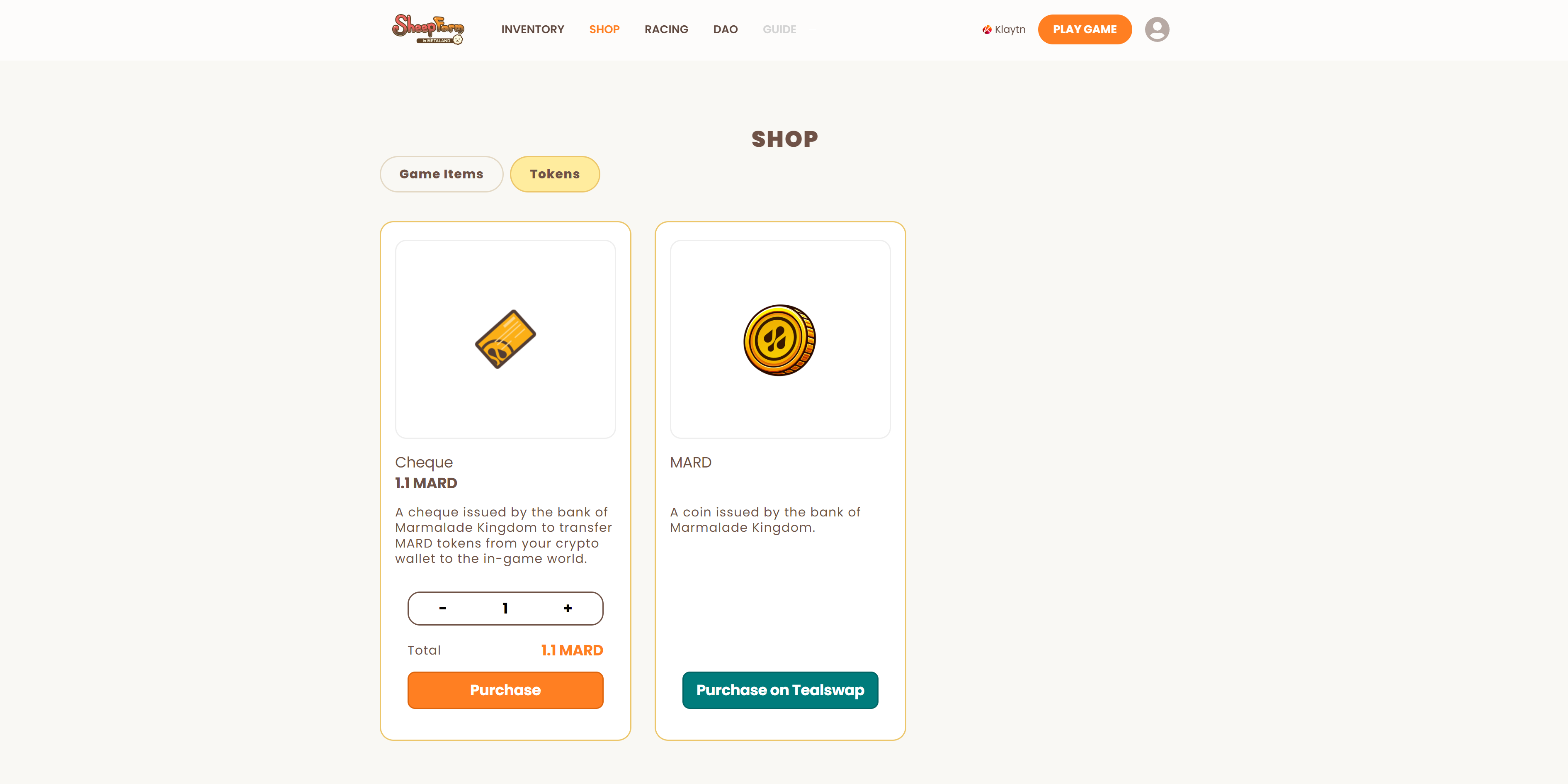
 [**Tealswap**](https://app.tealswap.com/en/swap/?chaintype=HOME\&tokentype=MARD).
4. **Choose Payment Method**: On Tealswap, you can either exchange other tokens or use a credit card to get the
[**Tealswap**](https://app.tealswap.com/en/swap/?chaintype=HOME\&tokentype=MARD).
4. **Choose Payment Method**: On Tealswap, you can either exchange other tokens or use a credit card to get the .png?alt=media&token=394fa900-6f44-4212-ab98-1eefb49f0952) **MARD tokens** you need.
5. **Complete Transaction**: Once the transaction is finalized, the
**MARD tokens** you need.
5. **Complete Transaction**: Once the transaction is finalized, the .png?alt=media&token=df590b73-12b4-464b-804c-cf38745058d5) **MARD tokens** will be credited directly to your wallet address, ready for use in the game.
**MARD tokens** will be credited directly to your wallet address, ready for use in the game.